# 在线对话工具

本节将介绍如何使用Web对话工具，配合使用OpenKey的接口进行ChatGPT对话。

对话网页：<https://chat.openkey.cloud/>

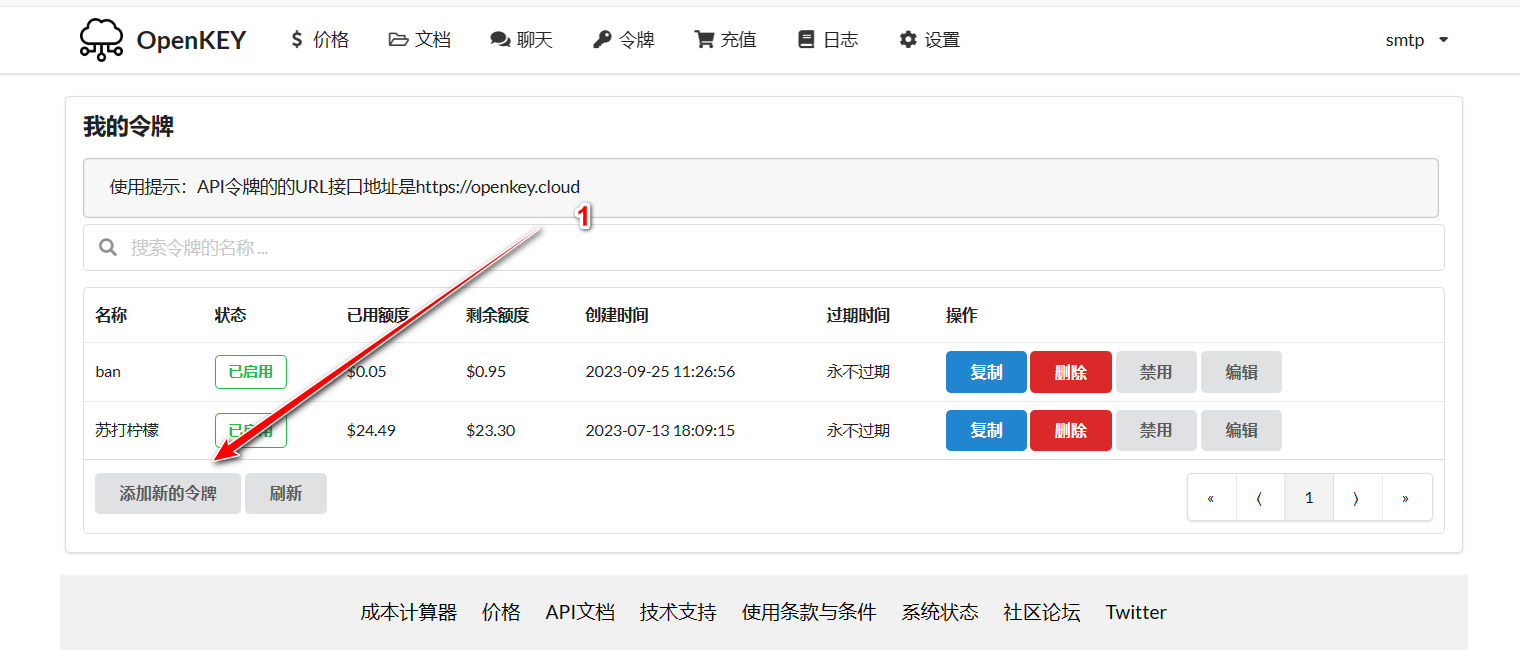
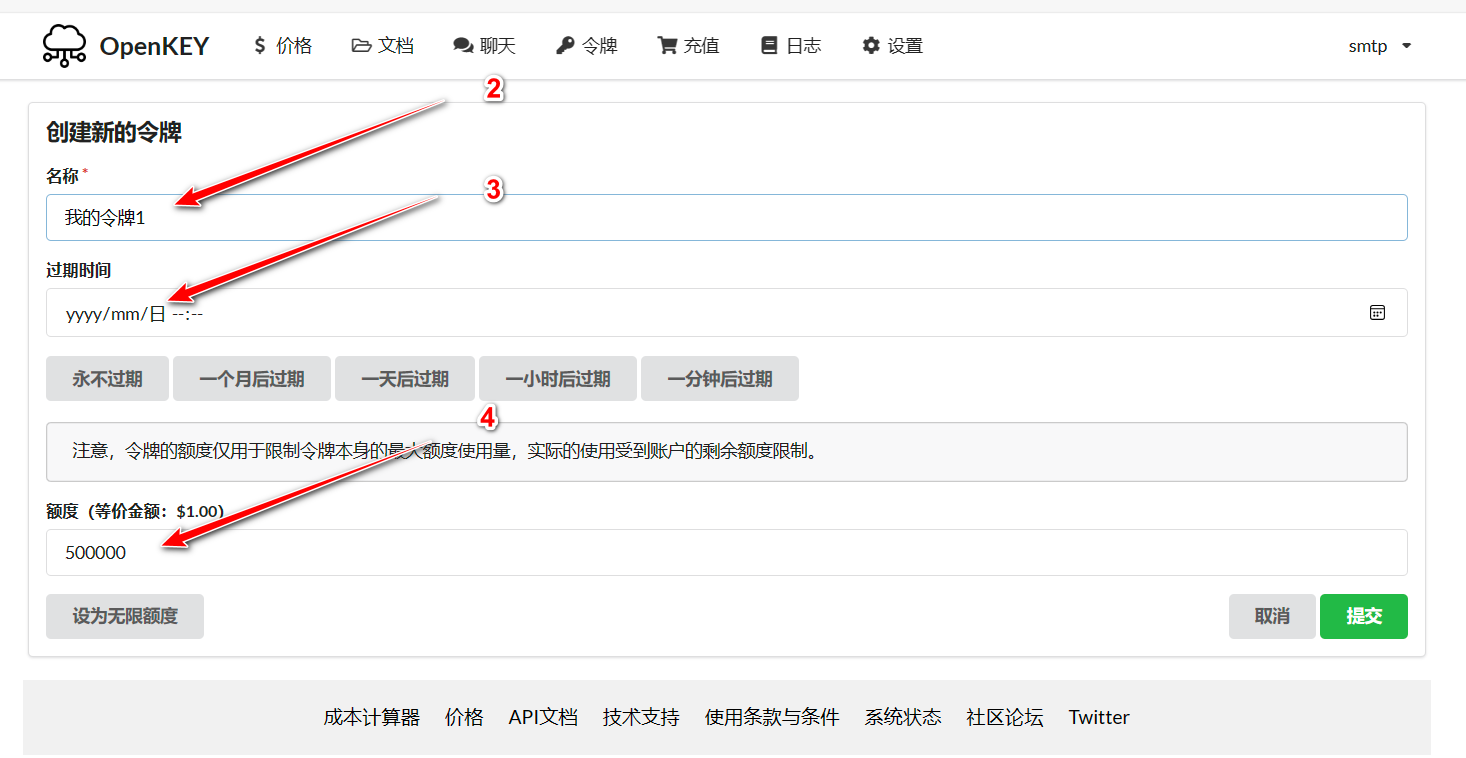
## 1. 创建令牌

请前往[令牌](https://openkey.cloud/token)页面，创建一个新令牌。

{% hint style="info" %}
注意：如果你是水龙头领取的令牌，请跳过这一步，领取的令牌是直接可以使用的。
{% endhint %}

<figure><img src="https://3504179993-files.gitbook.io/~/files/v0/b/gitbook-x-prod.appspot.com/o/spaces%2FfsS5hEXki2PLFCSvxXud%2Fuploads%2FpItkUwbHdrNbBVpYSyeU%2F1-1.png?alt=media&#x26;token=37dcbd5a-b4a9-4a9f-a102-95f6d14e8441" alt=""><figcaption><p>1-1</p></figcaption></figure>

<figure><img src="https://3504179993-files.gitbook.io/~/files/v0/b/gitbook-x-prod.appspot.com/o/spaces%2FfsS5hEXki2PLFCSvxXud%2Fuploads%2FOQqdwObvFZ4LBchbNFRv%2F1-2.png?alt=media&#x26;token=ae99ac21-ee17-4589-ba38-844e4c9d27f6" alt=""><figcaption><p>1-2</p></figcaption></figure>

## 2. 配置对话

打开[设置](https://chat.openkey.cloud/#/settings)页面，找到API KEY一栏，输入即可使用。

<figure><img src="https://3504179993-files.gitbook.io/~/files/v0/b/gitbook-x-prod.appspot.com/o/spaces%2FfsS5hEXki2PLFCSvxXud%2Fuploads%2FjwBx0q2Cq73GGHCJMvSA%2F2-1.png?alt=media&#x26;token=6de3fa19-830a-4ec3-8428-809fabf15090" alt=""><figcaption><p>2-1</p></figcaption></figure>

<figure><img src="https://3504179993-files.gitbook.io/~/files/v0/b/gitbook-x-prod.appspot.com/o/spaces%2FfsS5hEXki2PLFCSvxXud%2Fuploads%2F5jYbZI0Y2pgxKjtgerbc%2Fimage.png?alt=media&#x26;token=3be6ec15-070d-48c0-b934-51596c338f75" alt=""><figcaption></figcaption></figure>

## 3. 开始对话

完成以上步骤后就可以正常对话了，快来试试吧。

<figure><img src="https://3504179993-files.gitbook.io/~/files/v0/b/gitbook-x-prod.appspot.com/o/spaces%2FfsS5hEXki2PLFCSvxXud%2Fuploads%2FXVTykpjTUUQ4dpnswUdj%2FVideo_2023-10-19_112444.gif?alt=media&#x26;token=b8c38f44-d591-47d8-9d2a-adbf61d11a43" alt=""><figcaption><p>3</p></figcaption></figure>

OpenKey平台自2023年7月初开始运营，保持着99%的高可用性和稳定性，欢迎大家选购。

选购地址：<https://openkey.cloud/topup>

价格对照：<https://openkey.cloud/pricing>


---

# Agent Instructions: Querying This Documentation

If you need additional information that is not directly available in this page, you can query the documentation dynamically by asking a question.

Perform an HTTP GET request on the current page URL with the `ask` query parameter:

```
GET https://docs.openkey.cloud/usage/web-talk.md?ask=<question>
```

The question should be specific, self-contained, and written in natural language.
The response will contain a direct answer to the question and relevant excerpts and sources from the documentation.

Use this mechanism when the answer is not explicitly present in the current page, you need clarification or additional context, or you want to retrieve related documentation sections.